
AI experimentation
I use AI to close the gap between concept and working prototype - populating designs with realistic user data, tailoring content for different audiences, and turning flat screens into something that feels live.
But it needs a steady hand. AI drifts off-brand quickly, and generating a design system still means constant correction. Where it earns its keep is handling the repetitive structural work, freeing me to focus on craft and flow.
Revolut Savings Vaults - concept
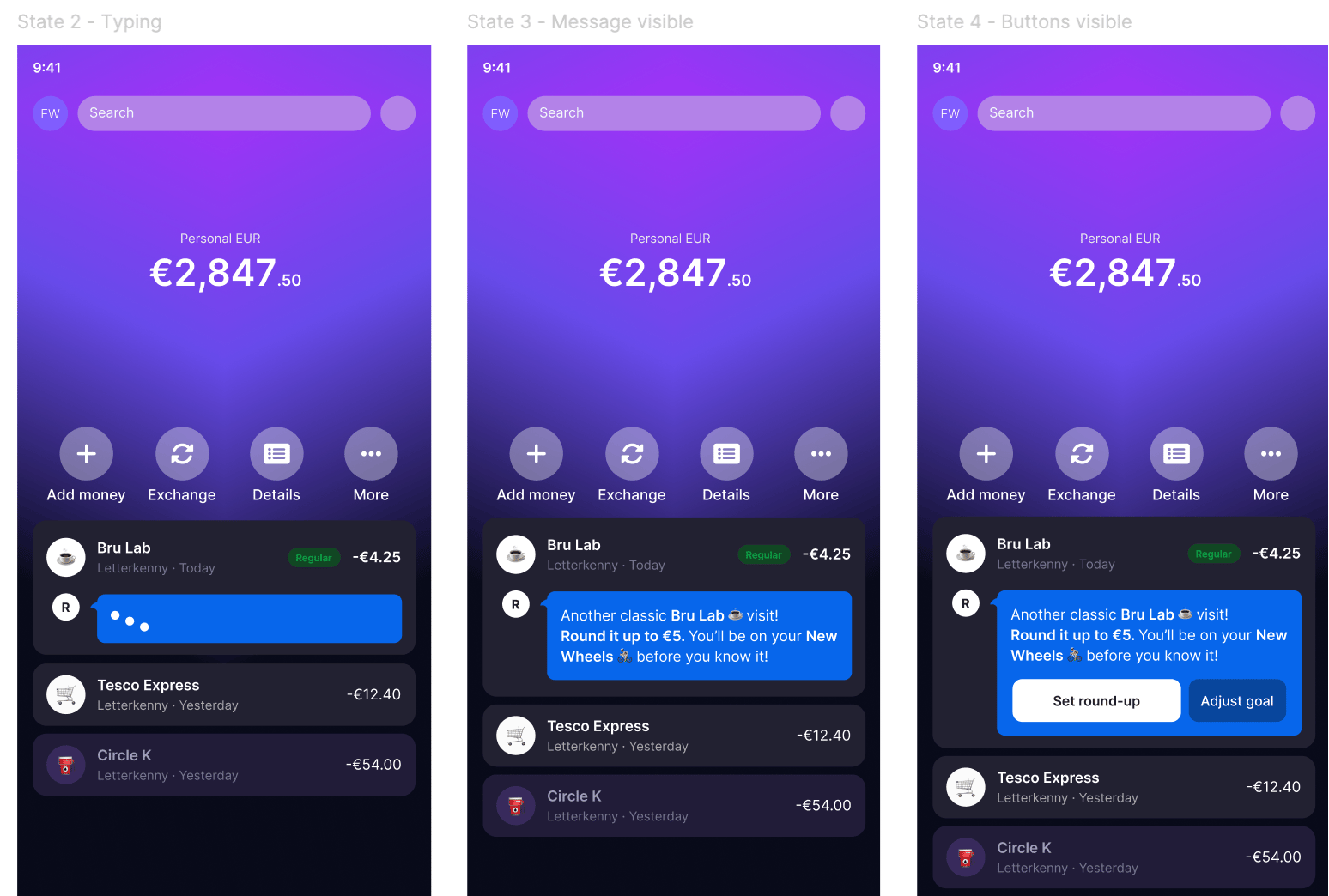
I explored why Revolut users abandon Savings Vaults after just one or two contributions. Starting with problem framing and a user journey map, I identified that the post-creation experience offers no next step - users are dropped back to the home screen with no prompt to build a habit.
I synthesised App Store reviews, competitor patterns from Monzo, and behavioural principles to land on a concept: a contextual round-up prompt embedded in the transaction feed. Rather than pushy notifications, the feature picks up on spending patterns - like a regular coffee purchase - and offers to round up the transaction toward the user's savings goal. I co-designed the UI with Claude via the Figma MCP, iterating on how the card expands inline without disrupting the transaction flow.
Figma Make
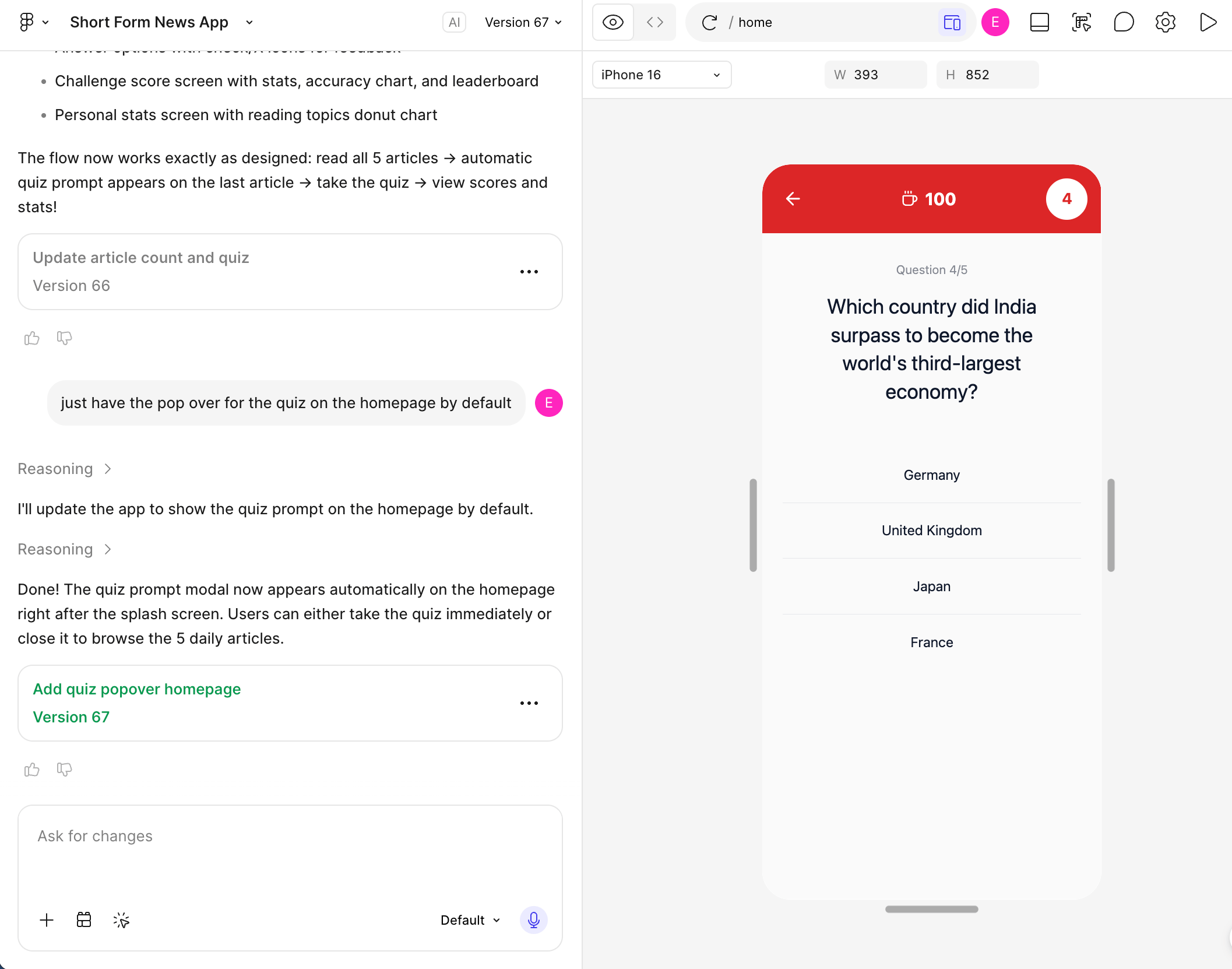
I used Figma Make to bring my Economist Espresso App designs to life. Starting from flat screens, I prompted it to pull current news from The Economist, summarise articles into short-form pieces that matched the publication's tone, and generate contextual quiz questions based on the day's stories. The reading habits and leaderboard stats were also populated with realistic data - making the whole prototype feel like a working product.
Claude Figma MCP
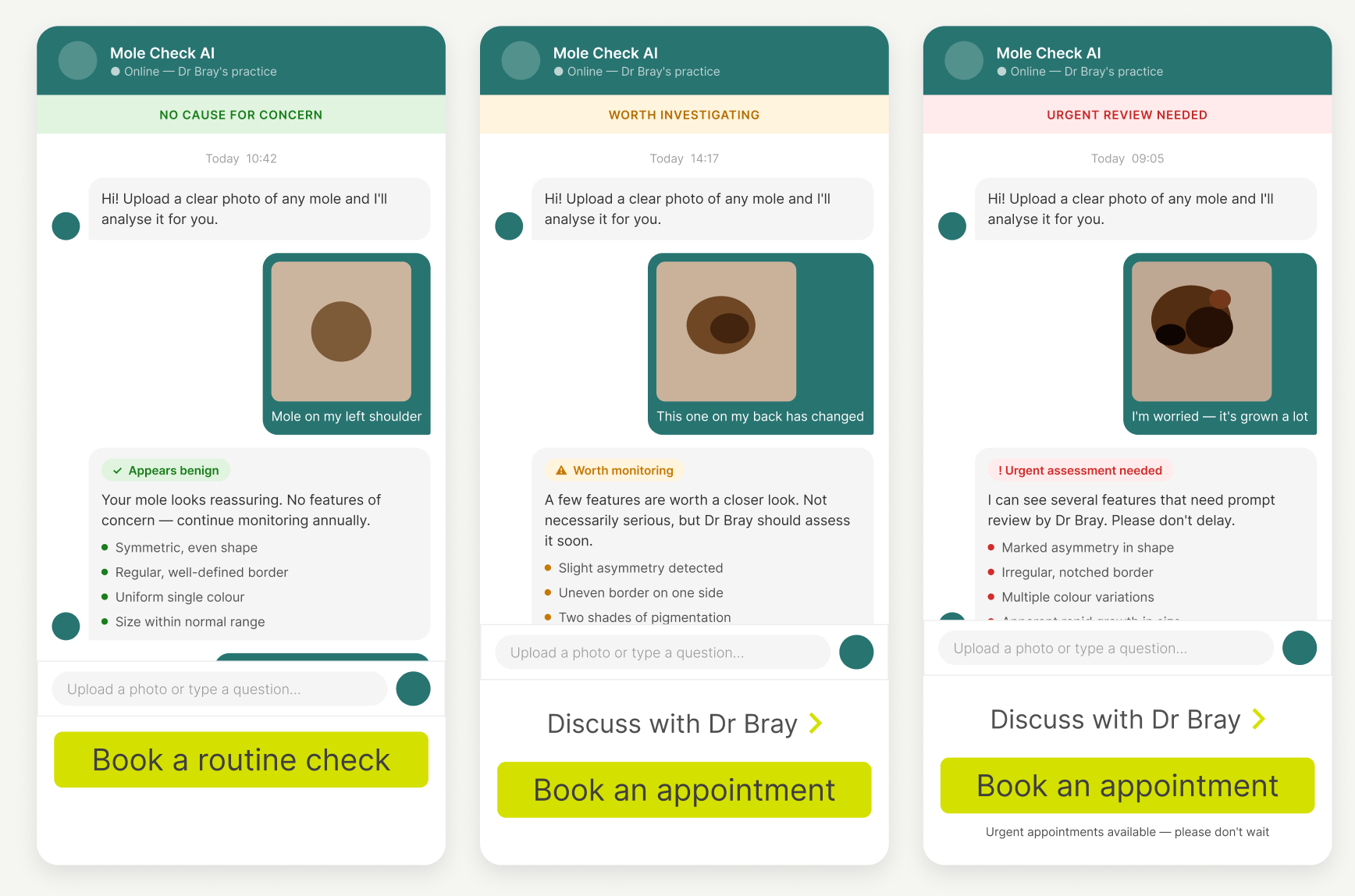
I connected Claude directly to my Figma file for the Adam Bray Dermatology website and used it to co-design a mole-checking upload feature. Working from my existing components and variables, Claude generated three variants of the flow - each responding differently based on the mole type identified.
GitHub Copilot in VS Code
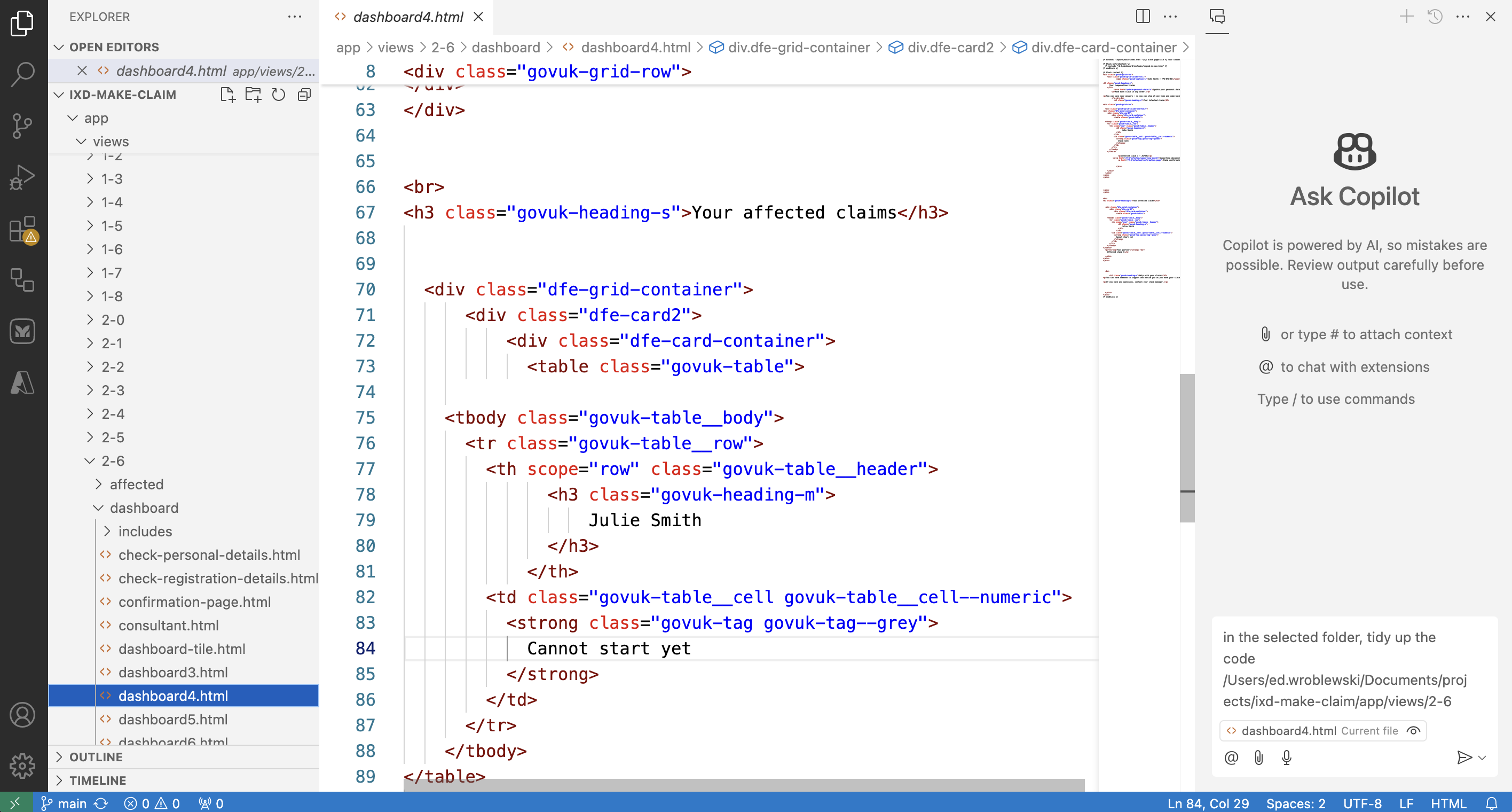
On public sector projects using the GOV.UK Prototype Kit, I've used Copilot to clean up code, catch label inconsistencies, and handle dynamic routing. It's powerful, but demands real technical fluency - designers need a solid grasp of the code to get value from it.
AI experimentation
I use AI to close the gap between concept and working prototype - populating designs with realistic user data, tailoring content for different audiences, and turning flat screens into something that feels live.
But it needs a steady hand. AI drifts off-brand quickly, and generating a design system still means constant correction. Where it earns its keep is handling the repetitive structural work, freeing me to focus on craft and flow.
Revolut Savings Vaults - concept
I explored why Revolut users abandon Savings Vaults after just one or two contributions. Starting with problem framing and a user journey map, I identified that the post-creation experience offers no next step - users are dropped back to the home screen with no prompt to build a habit.
I synthesised App Store reviews, competitor patterns from Monzo, and behavioural principles to land on a concept: a contextual round-up prompt embedded in the transaction feed. Rather than pushy notifications, the feature picks up on spending patterns - like a regular coffee purchase - and offers to round up the transaction toward the user's savings goal. I co-designed the UI with Claude via the Figma MCP, iterating on how the card expands inline without disrupting the transaction flow.
Figma Make
I used Figma Make to bring my Economist Espresso App designs to life. Starting from flat screens, I prompted it to pull current news from The Economist, summarise articles into short-form pieces that matched the publication's tone, and generate contextual quiz questions based on the day's stories. The reading habits and leaderboard stats were also populated with realistic data - making the whole prototype feel like a working product.
Claude Figma MCP
I connected Claude directly to my Figma file for the Adam Bray Dermatology website and used it to co-design a mole-checking upload feature. Working from my existing components and variables, Claude generated three variants of the flow - each responding differently based on the mole type identified.
GitHub Copilot in VS Code
On public sector projects using the GOV.UK Prototype Kit, I've used Copilot to clean up code, catch label inconsistencies, and handle dynamic routing. It's powerful, but demands real technical fluency - designers need a solid grasp of the code to get value from it.
AI experimentation
I use AI to close the gap between concept and working prototype - populating designs with realistic user data, tailoring content for different audiences, and turning flat screens into something that feels live.
But it needs a steady hand. AI drifts off-brand quickly, and generating a design system still means constant correction. Where it earns its keep is handling the repetitive structural work, freeing me to focus on craft and flow.
Revolut Savings Vaults - concept
I explored why Revolut users abandon Savings Vaults after just one or two contributions. Starting with problem framing and a user journey map, I identified that the post-creation experience offers no next step - users are dropped back to the home screen with no prompt to build a habit.
I synthesised App Store reviews, competitor patterns from Monzo, and behavioural principles to land on a concept: a contextual round-up prompt embedded in the transaction feed. Rather than pushy notifications, the feature picks up on spending patterns - like a regular coffee purchase - and offers to round up the transaction toward the user's savings goal. I co-designed the UI with Claude via the Figma MCP, iterating on how the card expands inline without disrupting the transaction flow.
Figma Make
I used Figma Make to bring my Economist Espresso App designs to life. Starting from flat screens, I prompted it to pull current news from The Economist, summarise articles into short-form pieces that matched the publication's tone, and generate contextual quiz questions based on the day's stories. The reading habits and leaderboard stats were also populated with realistic data - making the whole prototype feel like a working product.
Claude Figma MCP
I connected Claude directly to my Figma file for the Adam Bray Dermatology website and used it to co-design a mole-checking upload feature. Working from my existing components and variables, Claude generated three variants of the flow - each responding differently based on the mole type identified.
GitHub Copilot in VS Code
On public sector projects using the GOV.UK Prototype Kit, I've used Copilot to clean up code, catch label inconsistencies, and handle dynamic routing. It's powerful, but demands real technical fluency - designers need a solid grasp of the code to get value from it.